
Introduction
In todays digital world, online tools have become essential for managing everyday tasks, improving productivity, and growing businesses. Whether you are a student, freelancer, entrepreneur, or working professional, the right digital tools can help you save time, stay organized, and accomplish more with less effort.
From graphic design and document editing to project management and communication, online platforms offer powerful features that make complicated tasks easier. Many of these tools are accessible directly through a web browser, eliminating the need to install expensive software.
In this article, we’ll explore some of the most useful online tools and explain how they can simplify your daily workflow.
1. Canva – Create Professional Designs Easily
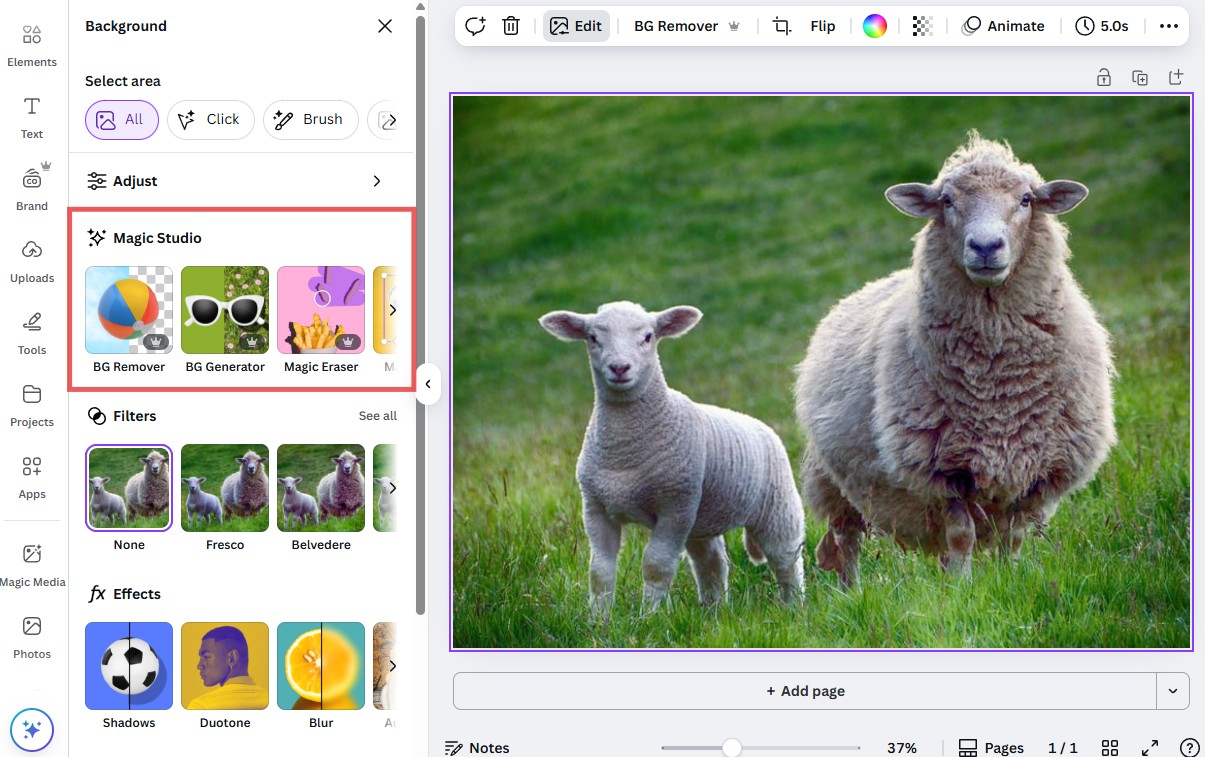
Canva is a popular online graphic design platform that helps users create visually appealing content without advanced design skills.
Whether you need social media graphics, presentations, posters, or marketing materials, Canva provides customizable templates and an easy-to-use editing interface.
Key Features:
- Ready-made design templates
- Drag-and-drop editing
- Social media graphics and presentations
- Team collaboration
- Image editing and branding features
Best For: Content creators, marketers, students, and small businesses.
| Name | Price |
| Noman | 200 |
2. Google Docs – Write and Collaborate Online
Google Docs is a cloud-based document editor that allows users to create, edit, and share documents from almost any device.
One of its biggest advantages is real-time collaboration. Multiple people can work on the same document simultaneously, making it useful for remote teams and collaborative projects.
Key Features:
- Real-time document editing
- Automatic cloud saving
- Document sharing and permissions
- Comments and suggestions
- Integration with Google Drive
Best For: Writers, students, businesses, and remote teams.
3. Trello – Organize Projects and Tasks
Managing multiple projects can become overwhelming without a proper system. Trello simplifies project management through visual boards, lists, and cards.
Users can organize tasks, assign responsibilities, set deadlines, and monitor progress in one central workspace.
Key Features:
- Visual task management boards
- Customizable workflows
- Team collaboration
- Due dates and checklists
- Automation and integrations
Best For: Freelancers, project managers, startups, and teams.
4. Grammarly – Improve Your Writing Quality
Clear communication is important in both personal and professional environments. Grammarly helps users improve their writing by identifying grammar, spelling, punctuation, and clarity issues.
It can be useful when writing emails, blog posts, business proposals, or professional documents.
Key Features:
- Grammar and spelling suggestions
- Writing clarity recommendations
- Tone suggestions
- Browser and application integrations
- AI-assisted writing features
Best For: Bloggers, students, professionals, and content writers.
5. Smallpdf – Manage PDF Documents Online
PDF files are commonly used for contracts, reports, invoices, and educational documents. Smallpdf provides web-based tools for handling PDF files without requiring specialized desktop software.
Users can convert, compress, merge, and organize PDF documents through a simple interface.
Key Features:
- PDF compression
- PDF conversion
- Merge and split documents
- Electronic signatures
- Basic PDF editing
Best For: Office workers, students, freelancers, and business owners.
6. Notion – Manage Notes, Projects, and Information
Notion is a flexible productivity workspace that combines note-taking, databases, project tracking, and documentation.
Instead of switching between multiple applications, users can organize important information in one platform.
Key Features:
- Customizable notes and pages
- Task and project databases
- Knowledge management
- Shared team workspaces
- Templates and automation options
Best For: Entrepreneurs, remote teams, students, and productivity enthusiasts.
7. ChatGPT – Get AI Assistance for Everyday Work
Artificial intelligence has introduced new opportunities to improve digital productivity. ChatGPT helps users brainstorm ideas, explain complicated topics, draft content, summarize information, and work through technical challenges.
It can support creative, educational, and professional activities, although important information should always be reviewed for accuracy.
Key Features:
- Content brainstorming and drafting
- Research assistance
- Coding and troubleshooting support
- Summarization and explanation
- Planning and idea development
Best For: Writers, developers, students, marketers, and business professionals.
Benefits of Using Online Tools
Online tools provide several advantages for individuals and businesses.
Save Time: Automating repetitive activities and simplifying complex workflows can reduce the time required to complete everyday tasks.
Improve Collaboration: Cloud-based platforms allow teams to share information and work together regardless of their physical location.
Reduce Costs: Many online tools offer free plans or affordable subscriptions, making professional features accessible to smaller organizations.
Work From Anywhere: Browser-based applications make it possible to access projects, documents, and important information across devices.
Increase Productivity: Using appropriate tools helps people focus on important tasks instead of spending unnecessary time on manual processes.
How to Choose the Right Online Tools
Before selecting an online tool, consider your specific needs, budget, and technical experience.
Start by identifying the problems you want to solve. For example, a graphic designer may benefit from Canva, while a project manager may prefer Trello or Notion.
You should also evaluate ease of use, security, available features, integration options, and subscription pricing. Testing free versions can help you determine whether a tool meets your expectations before committing to a paid plan.
Conclusion
Online tools are transforming how people work, communicate, and manage daily responsibilities. From creating professional graphics to organizing projects and editing documents, these digital solutions provide practical ways to work more efficiently.
Choosing the right combination of online tools can improve productivity, simplify workflows, and support business growth.
Start by exploring a few tools that match your needs, learn their essential features, and gradually build a digital workflow that helps you achieve better results.
The right online tools don’t just make work easier—they help you work smarter.